For DJs and entertainment

How Crema helps DJs turn inquiries into booked dates.

Crema is an event CRM that DJs and entertainment companies use to sell sets by the hour: an inquiry form on your site, package quotes the couple can compare and book, Square deposits, and a record of which DJ and which speakers are on every gig.

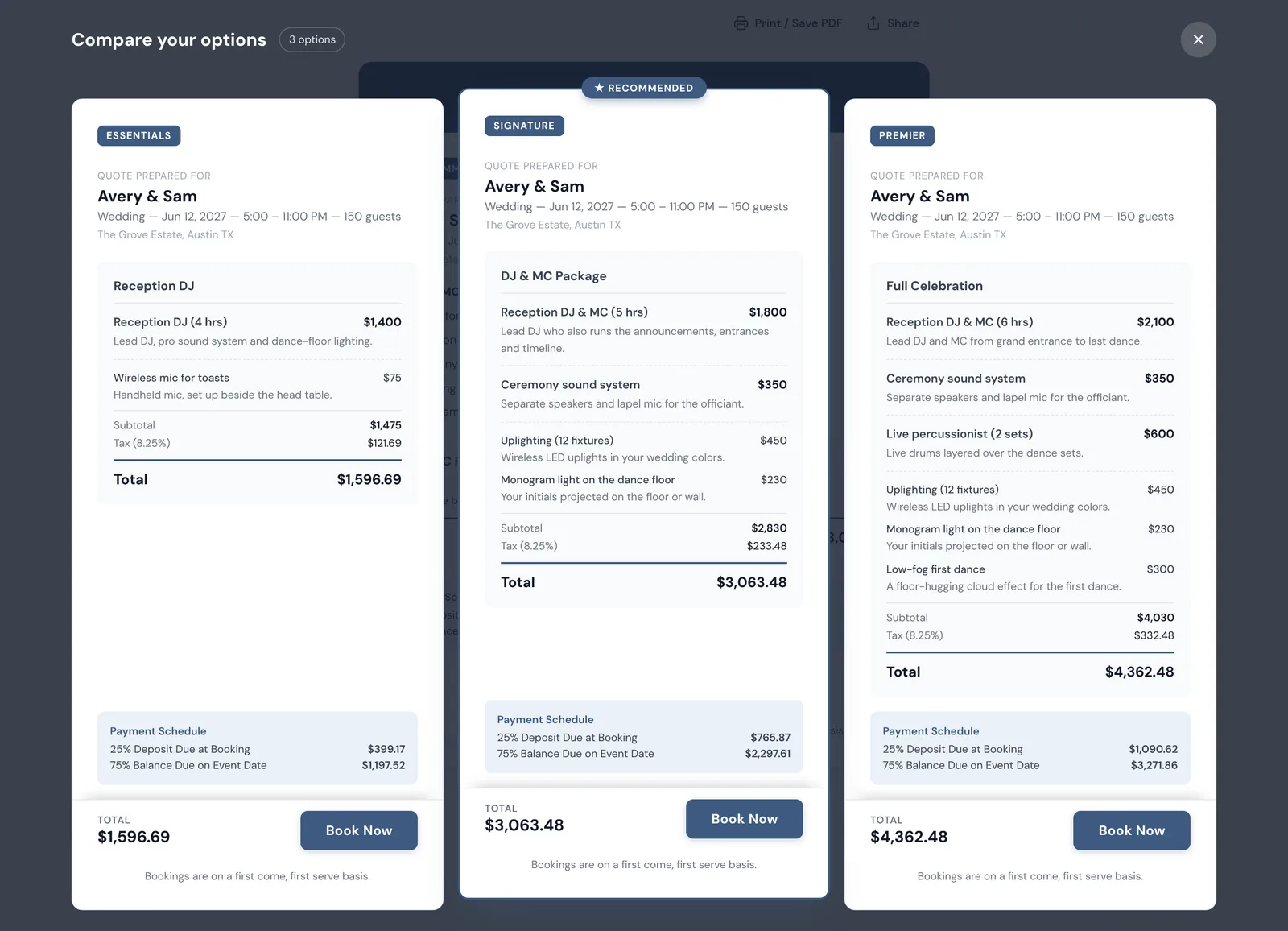
Crema published quote for a fictional DJ company, open on Compare your options: three wedding packages side by side, Essentials at $1,596.69, a recommended Signature DJ and MC package at $3,063.48 and Premier at $4,362.48, each listing its sets and add-ons with a 25% deposit schedule and a Book Now button.
One quote link, three packages: the client compares them side by side and books the one they want. Shown with a fictional DJ company and sample prices.

The short answer

What does Crema do for a DJ business?

It keeps the sale and the gig on one record. A wedding or party inquiry arrives with its date, hours and guest count, you answer with one link holding two or three packages, and the client pays a deposit to lock the date. After that the same event carries the assigned DJ, the sound and lighting gear, the client’s music questionnaire and the balance due.

Built for event work

From the first dance request to the last song

A DJ business sells the same evening several ways and then has to show up with the right person and the right gear. These tools follow that order.

Packages a couple can compare

Publish an Essentials, a Signature and a Premier option on one quote page. Mark the Signature as Recommended and it leads the page; a Compare view lays all three side by side with their totals, and every card has its own Book Now button.

See how Crema presents quotes

Hours, overtime and lighting add-ons

Charge for the reception by the hour, or sell a five-hour set with an overtime rate behind it; when the couple asks for a sixth hour, the quote grows a line for it. Uplighting, ceremony sound, a monogram projection or a second MC sit in your catalog as add-ons, each with a photo and its own price.

Full Saturdays can turn requests away

Switch on availability rules and the inquiry form on your website checks blackout days, a booking cap per day and a buffer between events, so a request for a Saturday you are already playing is turned away instead of landing as a lead you must decline.

See the inquiry form

Deposits now, the balance on the night

With Square connected, the client pays the deposit from the quote page and the saved card is charged for the rest on the event date. Turn on checkout upgrades and a couple can add uplighting or a low-fog first dance as they pay; the total and the deposit update before the card is charged.

Every speaker and DJ assigned to a gig

Add each speaker pair, mixer, lighting kit and mic as its own equipment record, then put the right ones on each event. Double-book the B sound kit across two receptions and Crema says so; put one DJ on two gigs the same day and you get a staff warning too. The DJ’s reminder email carries the add-ons the couple booked, so the uplights get packed.

See staff scheduling

Music questions answered before the day

Attach a questionnaire to wedding bookings that asks for the first dance song, the entrance order and a do-not-play list. The couple fills it in on the confirmation page, and optional reminder emails follow up on unfinished ones.
A repeatable process

One wedding inquiry, start to finish

An illustrative example: a couple asks about a 150-guest June reception from 5 to 11pm, with a ceremony on the same lawn.

  1. Inquire

    They fill in your website form with the date, hours and guest count. The date is open, so the request lands in your pipeline with the details already filled in.

  2. Quote

    You send one link with three packages. The couple opens Compare your options, asks in the quote chat whether the ceremony speakers can move to the patio, and you answer on the same page.

  3. Book

    They pick the Signature DJ and MC package, add a low-fog first dance from the upgrade list, and pay a 25% deposit. The event moves to the calendar, and with a one-event-per-day cap your form stops accepting that date.

  4. Play

    You assign a DJ and the B sound kit, the couple sends their first dance and do-not-play list through the questionnaire, and the balance is charged to their card on the wedding day.

Straight answers

DJ software questions

Can a client choose between several DJ packages on one link?

Yes. One published quote can hold up to five options. The client sees the recommended one first, can open a side-by-side comparison, and books any of them with its own deposit.

How do I charge for an extra hour?

Set how many hours a package covers and what each hour past that costs. A reception booked longer than the package gets its overtime as a separate, labelled line, priced at your rate.

Can I track which DJ and which sound system go to each event?

Yes. You put a DJ and the gear on each event yourself; DJs can tell you they are free beforehand through an email availability request or their personal shift board. Assigning the same DJ or kit twice raises a warning.

Do I need a separate contract tool?

Crema shows your terms on the quote and the client accepts them online when booking; it does not collect e-signatures. If your business requires a signed contract, keep that step in a dedicated signing tool.

What does Crema not do for DJs?

Crema does not manage music libraries, build playlists, connect to streaming services or run a timeline planner for the night. It runs the business side: inquiries, package quotes, Square payments, DJ and gear scheduling, and the client’s questionnaire answers.